AI Image to Video Generator
Turn image into video in seconds. Perfect for social media, marketing, and creators.
Using AI Video Generator from Image in 3 Steps
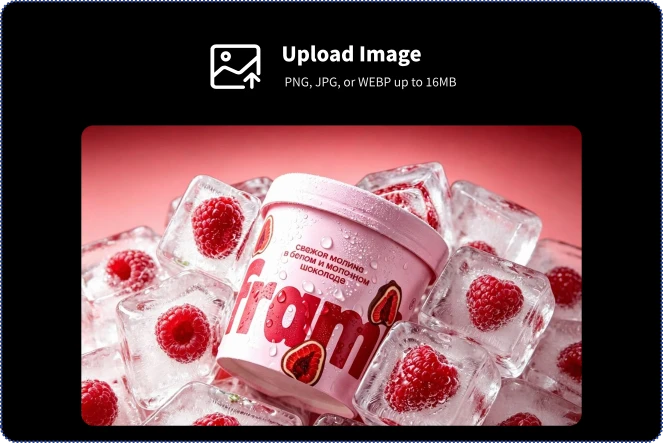
1. Upload Your Images
Upload any image to start creating AI videos. Support PNG, JPG, and WEBP files up to 16MB. High-quality images help generate smoother motion and sharper video results.
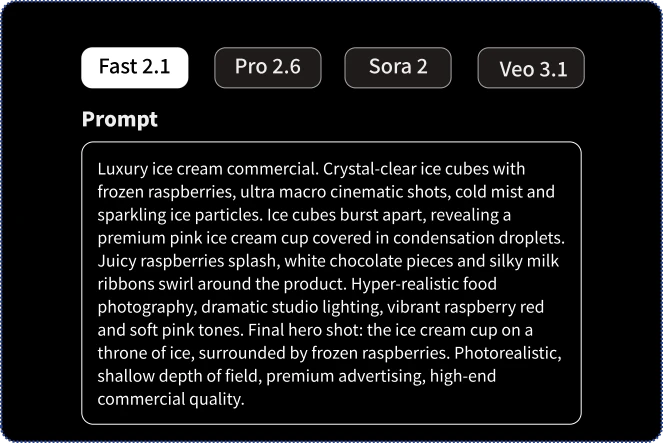
2. Customize Video Settings
Choose from advanced AI video models including Fast 2.1, Pro 2.6, Sora 2, and Veo 3.1. Adjust video duration, resolution, start and end frames, sound effects, and other settings to create your perfect video.
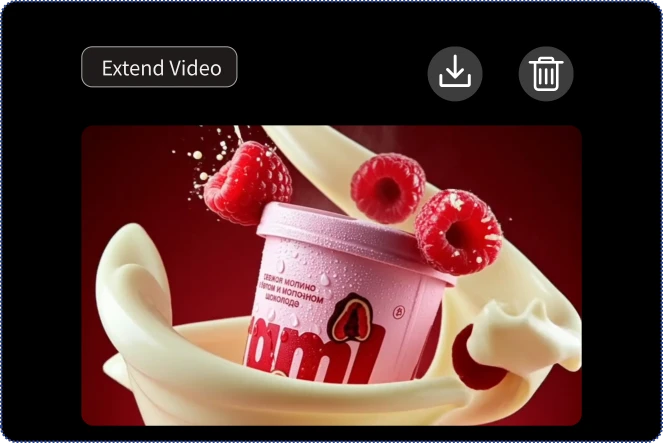
3. Refine & Download
Preview your generated video, make additional edits, extend video length, or regenerate new versions. When you’re satisfied, download your high-quality AI video instantly.
Upload a Photo, Watch It Transform
AI Birthday Videos
AI Product Commercials
AI Pet Videos
AI Action & Adventure Videos
AI Sci-Fi & Futuristic Videos
AI Talking Avatar Videos
Transform Images into Videos with AI Image to Video Generator
Multiple AI Models for Every Creation
With Fast 2.1, Pro 2.6, Sora 2, and Veo 3.1, the ImageMover AI Image to Video Generator gives you the flexibility to create video from photos in different styles. Generate high-quality AI videos with the perfect balance of speed, realism, and creative control.
Custom Start & End Frame Control
Unlike traditional tools, our image to video converter allows you to customize both start and end frames for greater creative control. Using ImageMover’s free image to video AI, you can create seamless motion, guide scene transitions, and generate more accurate videos from your photos.
Built for Creators, Marketers & Businesses
From AI product videos and e-commerce ads to TikTok content, YouTube Shorts, brand promotions, animated portraits, and social media campaigns, our image to video AI free unlimited tool helps you create stunning videos effortlessly. Turn any photo into engaging content with our powerful AI video generator from image technology.
Consistent Character & Scene Control
Maintain consistent characters, products, and scenes throughout every frame for smoother, more realistic video generation. Our image to video maker preserves visual identity and scene details, helping creators produce professional results with a free AI image to video generator.
Convert Images to Videos with Automatic AI Sound Effects
Enhance every AI video with realistic sound effects and ambient audio generated automatically by AI. Our free AI image to video generator helps turn any AI video from photo into a more immersive and cinematic experience, saving time on post-production and audio editing.
See why thousands of users choose our Photo to Video tool.
Our marketing team needed fresh social media content before a product launch. With ImageMover, we used its easy-to-use tools to create video from photos and generated over 20 AI videos in a single afternoon. The simple workflow saved us several days of creative production work.
Marcus Rivera
Last month, I tested multiple AI video tools and ended up choosing ImageMover. Using its powerful ai image to video generator with AI sound effects, high-quality output, and fast generation, I was able to create YouTube Shorts much faster. I now spend 80% less time producing short-form videos.
Priya Malhotra
Two weeks ago, I needed promotional content for a client campaign. ImageMover helped me turn static product images into cinematic marketing videos using Veo 3.1. The client approved the first draft, saving our team nearly 70% of production time and eliminating the need for expensive video editing.
Ethan Brooks
FAQ about Image to Video AI
What is an AI Image to Video Generator?
An AI Image to Video Generator transforms static images into dynamic videos using artificial intelligence. With ImageMover, you can create realistic motion, smooth transitions, and engaging visual content from a single photo in minutes.
Is the tool available in other languages?
Yes! We also provide pages in Japanese, French, Spanish, German, Italian, Dutch, Korean, and Portuguese.
Simply click “Switch to Japanese”, “Switch to French”, “Switch to Spanish”, “Switch to German”, “Switch to Italian”, “Switch to Dutch”, “Switch to Korean”, or “Switch to Portuguese” to browse the tool in your preferred language.
What image formats does ImageMover support?
You can upload PNG, JPG, and WEBP images up to 16MB. For the best results, we recommend using clear, high-resolution images.
What video format will I receive?
All generated videos are exported in MP4 format, making them easy to share on social media platforms, websites, and marketing campaigns.
Is ImageMover free to use?
Yes. ImageMover offers a free AI image to video generator experience, allowing users to create and test AI-generated videos before upgrading for additional features and credits.
Do I need to write a prompt myself?
No. ImageMover includes an AI prompt generation feature. You can simply upload an image, and the AI will automatically suggest a creative prompt for you.
How do I use the Custom Start & End Frame feature?
The Custom Start & End Frame feature allows you to define exactly how your video begins and ends. By selecting specific opening and closing images, you can create smoother transitions, maintain character and scene consistency, and achieve more professional, controlled video results.
Can I edit or extend my video after generation?
Yes. You can continue editing your project, adjust settings, regenerate variations, or extend the video length before downloading the final version.
Does ImageMover add watermarks to videos?
No. ImageMover supports high-quality video exports without watermarks, ensuring your content looks professional and ready for personal or commercial use.
What can I use ImageMover for?
ImageMover is perfect for AI product videos, social media content, TikTok videos, YouTube Shorts, marketing campaigns, animated portraits, travel stories, and other creative projects.
Is my data secure?
Yes. We take user privacy seriously. Uploaded images and generated videos are processed securely, and your content is never shared with third parties without your permission.
Discover the Benefits of ImageMove’s Free AI Image To Video Generator
User-Friendly Interface
Our AI Image to Video Generator makes creation easy for everyone, and ImageMover keeps the entire process intuitive and user-friendly.
Fast and Efficient
Time is precious. Our free Image to Video AI delivers fast results without sacrificing quality.
Advanced AI Technology
Our advanced AI algorithms make your videos visually appealing and professionally produced. Try the creative power of our AI Image to Video Generator .

Start Creating with Your AI Image to Video Generator!
Don’t wait—experience the power of ImageMover now. Our AI-driven Free AI Image to Video Generator makes creating stunning videos effortless.